The FAQPage schema is one of the most powerful builders in Schema Pillar Pro. When validated by Google, this schema generates highly visible, interactive "accordion" rich results directly on the search page, instantly increasing your click-through rate.
Standard search results give you a title and a description. A validated FAQPage gives you massive visual real estate, pushing your competitors further down the page.
Read our comprehensive return policy. Find answers to common questions regarding refunds, exchanges, and international shipping.
Google explicitly requires that the questions and answers you place in the Schema Builder must also be visible to the user on the actual webpage. Do not use FAQ schema to hide keywords; Google will penalize the page.
An FAQ is useless to a search engine if it doesn't know what the questions are about. Is it an FAQ about a Medical Condition? A Software Product? A Local Business?
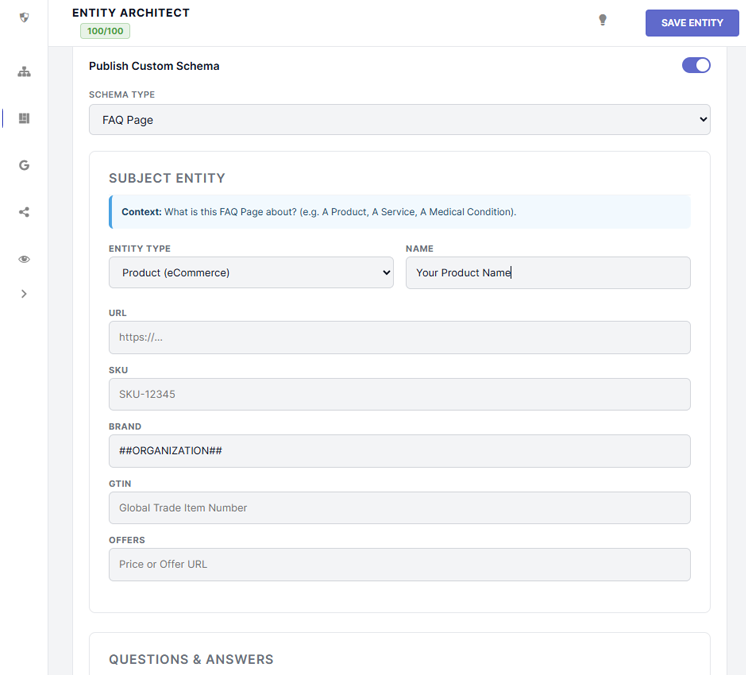
The Subject Entity section asks you to define the exact Thing the FAQ relates to. Use the Entity Type dropdown to select the category (e.g., Product) and then provide the URL/sameAs link (e.g., the link to your specific product page or a Wikipedia article).
Click the dashed + Add Question button to generate a new repeater row. Enter the exact question string and the exact answer string as they appear on your physical webpage.
You can use basic HTML tags inside the Answer box (like <a href="...">, <strong>, and <br>) to ensure the rich snippet in Google maintains its formatting and provides clickable links.
SPP will automatically format these inputs into nested Question and Answer nodes within the `mainEntity` array of the `FAQPage`.
Because FAQs are inherently conversational, the SPP Engine automatically attaches a SpeakableSpecification to your FAQPage schema. This instructs voice assistants (like Google Assistant and Alexa) to read these specific answers aloud when users ask the corresponding questions verbally.
