The Article Schema format is the backbone of the semantic web. This is the foundational builder you will use for standard blog posts, news updates, and general content marketing.
Search engines are getting better at reading content, but they still prefer explicit declarations. The Primary Subject Entity section allows you to define exactly what your article is about.
By mapping your Primary Subject to a known Wikipedia URL via the sameAs property, you instantly tether your content to Google's massive, pre-existing Knowledge Graph.
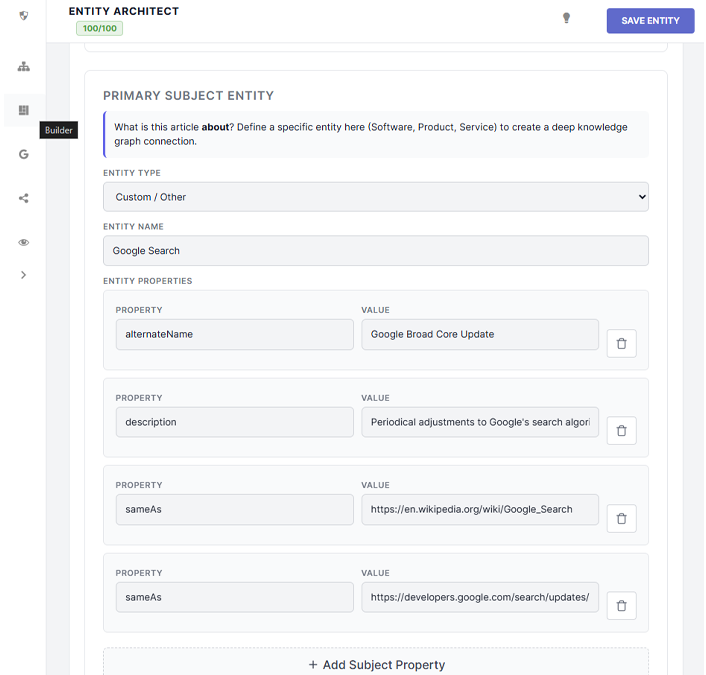
Use the "Entity Type" dropdown to select common subjects (like Product, Software, or Service). If your article doesn't fit a standard mold, select Custom / Other and manually type in the concept (e.g., "Semantic Web").
Build deep context by referencing external sources and concepts. These properties are injected into your Article node as data points.
Use this when your article derived factual information from another source (like a study, manual, or quote). SPP formats these as CreativeWork entities.
Use this to list people, places, or concepts that are briefly mentioned in your text but are not the primary focus. SPP formats these as Thing entities.
Use this to inject URLs pointing to highly relevant external resources that provide necessary context to the user.
By default, the SPP Engine automatically maps the article to the WordPress Post Author, pulling their full profile data (Job Title, Awards, Alumni, Socials) established in the Author Graph.
If you are publishing a guest post, you can use the radio buttons to select a different registered WordPress user, or completely override the system and manually type in a custom author name and URL.
Regardless of the author, SPP automatically applies a reviewedBy property to the Article, assigning your master Organization node as the reviewing publisher. This is a massive E-E-A-T signal proving editorial oversight.
